Flexible 3D Printer Filament Types: Guide to TPE, TPU, and Beyond

If you have ever tried to print a flexible phone case or a custom rubber gasket, you probably know the frustration. Many makers actively avoid flexible filaments because they are notorious for causing jammed extruders, severe stringing, and completely failed prints. It can be incredibly intimidating to spend money on a spool of material only for it to wrap around your printer's gears like a wet noodle.
Fortunately, printing bendable, shock-absorbing, and wearable parts doesn't have to be a nightmare. The secret to success lies in understanding that "flexible filament" is not just one material—it is a wide spectrum of plastics. By learning how to read the hardness scale, choosing the right material for your specific project, and pairing it with a capable direct-drive 3D printer, you can print flexible parts just as easily as standard PLA.
Here is everything you need to know about 3D printer filaments designed to bend, stretch, and bounce.
Key Takeaways
- Decode the Labels: "TPE" is the overarching family of flexible 3D printing plastics, while "TPU" is a specific, highly popular material within that family. Always check the Shore A hardness scale to know exactly how soft the material will be before you buy.
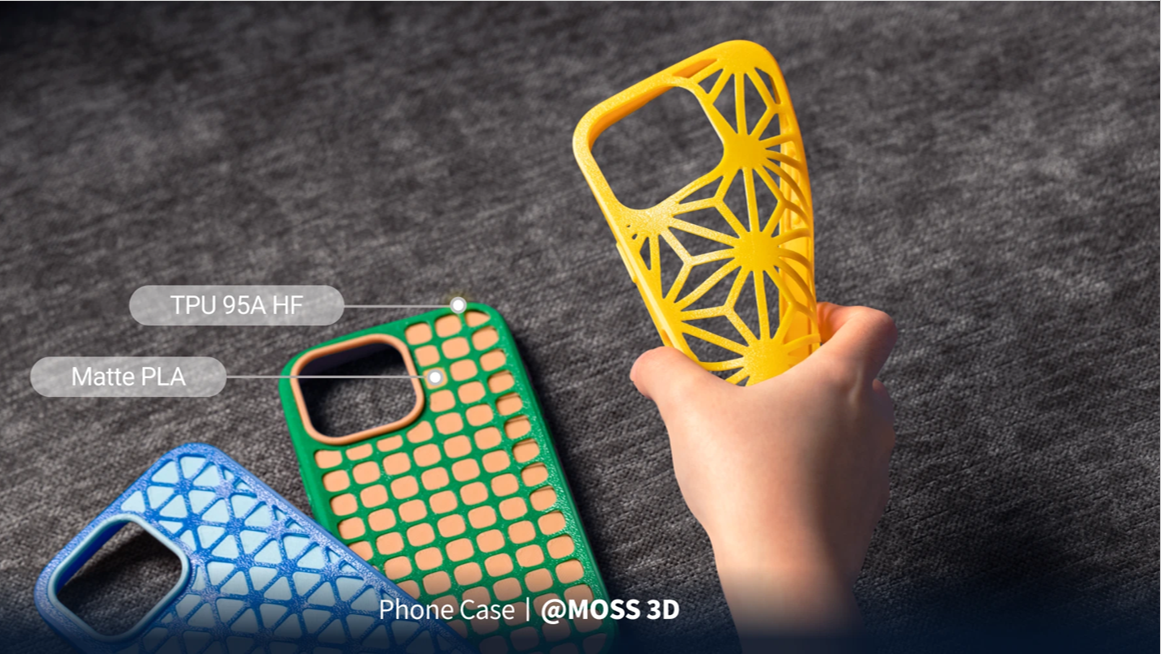
- Match the Material to the Application: Choose an ultra-soft TPU 90A for highly elastic, shock-absorbing wearables (like shoes), or opt for a firmer TPU 95A HF (High Flow) for durable, high-speed prints like phone cases and RC tires.
- Upgrade Your Hardware: Flexible filaments buckle in standard Bowden tubes. A direct-drive extruder—ideally on a high-speed CoreXY machine like the Snapmaker U1—is required to reliably push soft plastics without gear jams.
- Nail the Preparation and Settings: TPU acts like a sponge for ambient humidity and must be actively dried before printing. Once dry, load it manually, turn off dynamic flow calibration, and use a 15% - 20% Gyroid infill to perfectly mimic the comfortable squish of commercial EVA foam.
Understanding the Shore Hardness Scale
Before you buy a spool of flexible filament, you need to know how to read the label. Flexible materials are categorized by their Shore Hardness, a standardized scale used to measure how resistant a material is to indentation.
Shore 00, Shore A, and Shore D Explained
In the manufacturing world, there are several overlapping Shore scales used to evaluate different types of materials. The three most common scales you will encounter are Shore 00, Shore A, and Shore D:
- Shore 00 (Extremely Soft): This scale is reserved for very soft rubbers and gels, such as light foams and sponge rubber. Real-world examples include gummy bears (around 10-15 Shore 00) and gel shoe insoles (around 30-35 Shore 00). You will rarely see 3D printer filaments measured on this scale, as material this soft is virtually impossible to push through an extruder gear without buckling.
- Shore A (Soft & Flexible): This scale measures softer, rubber-like materials and elastomers. Common examples on this scale range from highly elastic rubber bands (20A) to firm shoe soles (70A). Almost all flexible 3D printing filaments are measured on the Shore A scale.
- Shore D (Hard & Rigid): This scale is used to measure hard rubbers, semi-rigid plastics, and highly rigid thermoplastics like PVC pipe. Real-world examples include golf balls (50D) and construction hard hats.
What Do the Numbers Actually Mean? (90A vs. 95A)
On any Shore scale, the measurements range from 0 to 100. Lower numbers indicate softer materials with less resistance to indentation, while higher numbers indicate a firmer, harder material.
When shopping for flexible 3D filaments, you will primarily be looking at the higher end of the Shore A scale:
- 90A (Ultra-Soft for 3D Printing): Materials like Snapmaker TPU 90A have incredible dynamic compression and rebound. If you squeeze it, it feels like the dense, spongy foam of a commercial running shoe or an EVA foam clog. Because it is so soft, it requires precise printer settings and a direct-drive setup to avoid jams.
- 95A (Firm but Flexible): Materials like Snapmaker TPU 95A HF (High Flow) feel closer to a skateboard wheel or a dense shopping cart tire. It is stiff enough to be easily pushed through a 3D printer at high speeds without buckling, yet flexible enough to absorb high impacts. 95A is the absolute best starting point for beginners.
The Core Flexible 3D Filament Types Explained
When shopping for flexible filaments, you will encounter a veritable alphabet soup of acronyms. To help you navigate the market, here is a quick reference guide, followed by a detailed breakdown of each material.
The "Flexible Filament" Misconception: TPE vs. TPU
The biggest point of confusion for beginners is the difference between TPE and TPU. TPE (Thermoplastic Elastomer) is not a single specific filament; it is the umbrella term for the entire family of rubber-like 3D printing plastics. TPU (Thermoplastic Polyurethane) is simply one specific child within that family.
If you see a spool labeled simply as "TPE," the manufacturer is usually referring to an older, ultra-soft blend. If you see "TPU," you are looking at the modern industry standard.
TPU 90A: The Ultra-Soft, Skin-Friendly Cushion
For projects requiring maximum comfort and rebound, a 90A TPU is paramount. For example, Snapmaker TPU 90A is engineered for incredible dynamic compression, achieving a massive breaking elongation rate of 592.1% and a tensile strength of 30.1 MPa. Because of its low melt index (6.1 g/10 min), it requires precise, slower printing speeds (30–50 mm/s) and strict manual loading. However, the payoff is a silky, skin-friendly material that offers superior shock absorption, making it the ultimate choice for wearable insoles, protective padding, and ergonomic grips.
TPU 95A HF (High Flow): The High-Speed Workhorse
If you need durability without the slow print times, a high-flow 95A is the answer. Upgraded formulations, like Snapmaker TPU 95A HF, feature a massive melt index of 28.5 g/10 min. This means the plastic flows incredibly smoothly through the heated nozzle, unlocking rapid printing speeds of 50–110 mm/s—nearly double that of softer TPUs. With a breaking elongation rate of 459.25% and excellent bending resistance (64.19 MPa bending modulus), it is the premier choice for phone cases, sealing gaskets, and RC drone mounts.
TPC (Thermoplastic Copolyester): The Industrial Choice
TPC is an engineering-grade flexible filament. While it shares the rubber-like qualities of TPU, TPC boasts exceptional resistance to high temperatures and harsh chemicals. It is rarely used by hobbyists, but it is the go-to choice for automotive applications, high-heat gaskets, and under-the-hood mechanical components.
Soft PLA / Flexible PLA: The Beginner-Friendly Alternative
If your printer completely struggles with rubbery materials, Flexible PLA is a great stepping stone. It is essentially standard PLA treated with chemical plasticizers. The result is a material that is "bendable" but not "stretchy." It is perfect for printing belts, hinges, or decorative cosplay armor, but it lacks the dynamic bounce and impact resistance of true TPU.
Hardware & Slicer Settings for Flexible Filament Success
Printing with TPU often fails because standard hardware or slicer settings try to treat it like a rigid plastic. Here are the expert SOPs (Standard Operating Procedures) to guarantee a flawless print.
Equip a Direct Drive Extruder for Reliable Feeding
3D printers generally use one of two extrusion systems: Bowden or Direct Drive.
- Bowden Extruders push the filament through a long tube before it reaches the hot nozzle. Trying to push soft TPU through a long Bowden tube is like trying to push a wet noodle through a drinking straw—it will buckle, coil, and jam.
- Direct Drive Extruders sit directly on top of the print head, gripping and melting the filament instantly with almost zero travel distance.
If you want to print flexible materials reliably, a Direct Drive extruder is highly recommended. Modern CoreXY machines equipped with advanced toolheads, such as the Snapmaker U1, are engineered specifically to handle the rapid extrusion of soft materials. Utilizing input shaping and vibration compensation, the U1 can push high-flow TPU at blistering infill speeds of up to 270 mm/s.
Utilize Multi-Material Printing for Clean Support Removal
One of the hardest parts of printing flexible models is removing the support structures—you cannot easily snap off supports if the material just stretches and bends!
If you have a multi-material 3D printer (like the Snapmaker U1 with its SnapSwap™ toolheads), you can assign a hard, rigid material like SnapSpeed PLA or PETG to print the support structures. Because PLA and TPU do not chemically bond to one another, the hard PLA supports will cleanly break away from the soft TPU model by hand, leaving a flawless surface finish.
Dry Your Filament Thoroughly Before Printing
TPU is incredibly hygroscopic, meaning it acts like a sponge for ambient humidity. If your TPU is wet, the moisture will boil inside the nozzle, causing popping sounds, severe stringing, and porous, weak models.
- Pre-Drying: Always dry your 3D printer filament in an active dryer (like the SnapDryer) at 70°C for 6 to 12 hours before printing.
- Active Drying: For multi-day prints (like a large pair of shoes), feed the TPU directly from the active dryer into the printer to completely seal it off from room humidity.
Configure Your Slicer Settings for Soft Materials
Even with the best hardware, you need the right instructions. If you are using software like Snapmaker Orca, utilize the official pre-tuned material profiles. Otherwise, follow these rules:
- Manual Loading Only: Never use an "Auto-Load" feature with flexible filaments, as the speed can cause the material to knot inside the gears. Cut the tip at a 45-degree angle and feed it in manually.
- Infill for Comfort: If you want to 3D print wearable shoes, you must avoid a critical mistake: if you force the use of standard rigid plastics or stiffer TPU 95A at a high infill density, the resulting shoe sole will be a heavy, unyielding block of plastic that causes immediate foot fatigue and offers zero cushioning. To achieve comfort, pair the ultra-soft TPU 90A with a 15% - 20% Gyroid infill. This wavy 3D internal structure allows the elastic TPU to compress dynamically and bounce back under body weight, perfectly mimicking the lightweight, shock-absorbing comfort of commercial EVA shoe foam.
- Turn Off Dynamic Flow Calibration: Because TPU stretches and compresses as it is pushed, automated flow calibration sensors will read inaccurate data. Turn this feature off for soft materials.
- Slow Down Retractions: Keep your retraction lengths very short (around 1.0mm to 1.5mm on a direct drive) and your retraction speeds slow (10-20 mm/s). Yanking TPU backwards too fast will stretch it like a rubber band and cause a jam.
Which Flexible Filament Should You Choose?
Still not sure what to load into your printer? Use this quick cheat sheet:
- For Wearables, Shoe Soles, & Dampeners: Choose TPU 90A. It offers the best shock absorption and spongy rebound.
- For Phone Cases, RC Tires, & Drone Mounts: Choose TPU 95A HF. It is highly durable, firm enough to hold its shape, and incredibly easy to print.
- For Under-the-Hood Auto Parts & High Heat: Choose TPC.
- For Decorative, Bendable Props: Choose Soft PLA.
Frequently Asked Questions About Flexible Filaments
Is TPU the only flexible filament?
No. While TPU (Thermoplastic Polyurethane) is the most popular and easiest to print, it belongs to a larger family of flexible plastics called TPE (Thermoplastic Elastomers). Other options include TPC (heat resistant) and Soft PLA.
Which is softer, TPU or TPE?
Generally, filaments branded strictly as TPE are softer and more elastic than TPU. TPU is formulated to be slightly more rigid, which sacrifices a tiny bit of stretchiness in exchange for being vastly easier to push through a 3D printer without jamming.
Is PLA or PETG flexible?
Standard PLA and PETG are rigid plastics and will snap if bent too far. However, PETG has a slight natural "give" to it compared to the brittle nature of PLA, making it suitable for snap-fit joints. If you need true flexibility, you must use a specialized Soft PLA or a TPU.
How do I remove TPU from the print bed?
TPU adheres incredibly well to PEI build plates—sometimes too well. Never forcefully yank a TPU print off the bed, or you may rip the material. Let the heated bed cool completely, slightly flex the steel plate, and spray a little Isopropyl Alcohol (rubbing alcohol) at the seam where the print meets the bed. The alcohol will instantly release the adhesion, and the part will pop right off.
Here is a helpful video tutorial detailing the proper setup, slicing, and printing process for TPU on the Snapmaker U1: U1 Video Guide: Printing with TPU